img not found!

Certificate in VFX Video Editing

Certificate in VFX Video Editing

₹6,500.00 ₹3,250.00

50% fee concession will end in

A Certificate in VFX (Visual Effects) Video Editing is a specialized course designed to teach individuals the skills needed to create, edit, and enhance video content using visual effects techniques. This course combines aspects of video editing and VFX, providing a comprehensive understanding of how to manipulate and add visual effects to videos in post-production.

Description

Course Name: Certificate in VFX Video Editing

Course Id: CVFX/Q0001.

Eligibility: 10th Grade (high School) or equivalent.

Objective: A Certificate in VFX Video Editing provides the necessary skills for individuals looking to enter the world of visual effects and video production. This course is highly valuable for those interested in creating dynamic, visually rich content for films, television, advertising, gaming, and online platforms.

Duration: Three Months.

How to Enroll and Get Certified in Your Chosen Course:

Step 1:┬аChoose the course you wish to get certified in.

Step 2:┬аClick on the┬атАЬEnroll NowтАЭ┬аbutton.

Step 3:┬аProceed with the enrollment process.

Step 4:┬аEnter your billing details and continue to course fee payment.

Step 5:┬аYou will be redirected to the payment gateway. Pay the course and exam fee using one of the following methods:
Debit/Credit Card, Wallet, Paytm, Net Banking, UPI, or Google Pay.

Step 6:┬аAfter successful payment, you will receive your study material login ID and password via email within┬а48 hours┬аof fee payment.

Step 7:┬аOnce you complete the course, take the┬аonline examination.

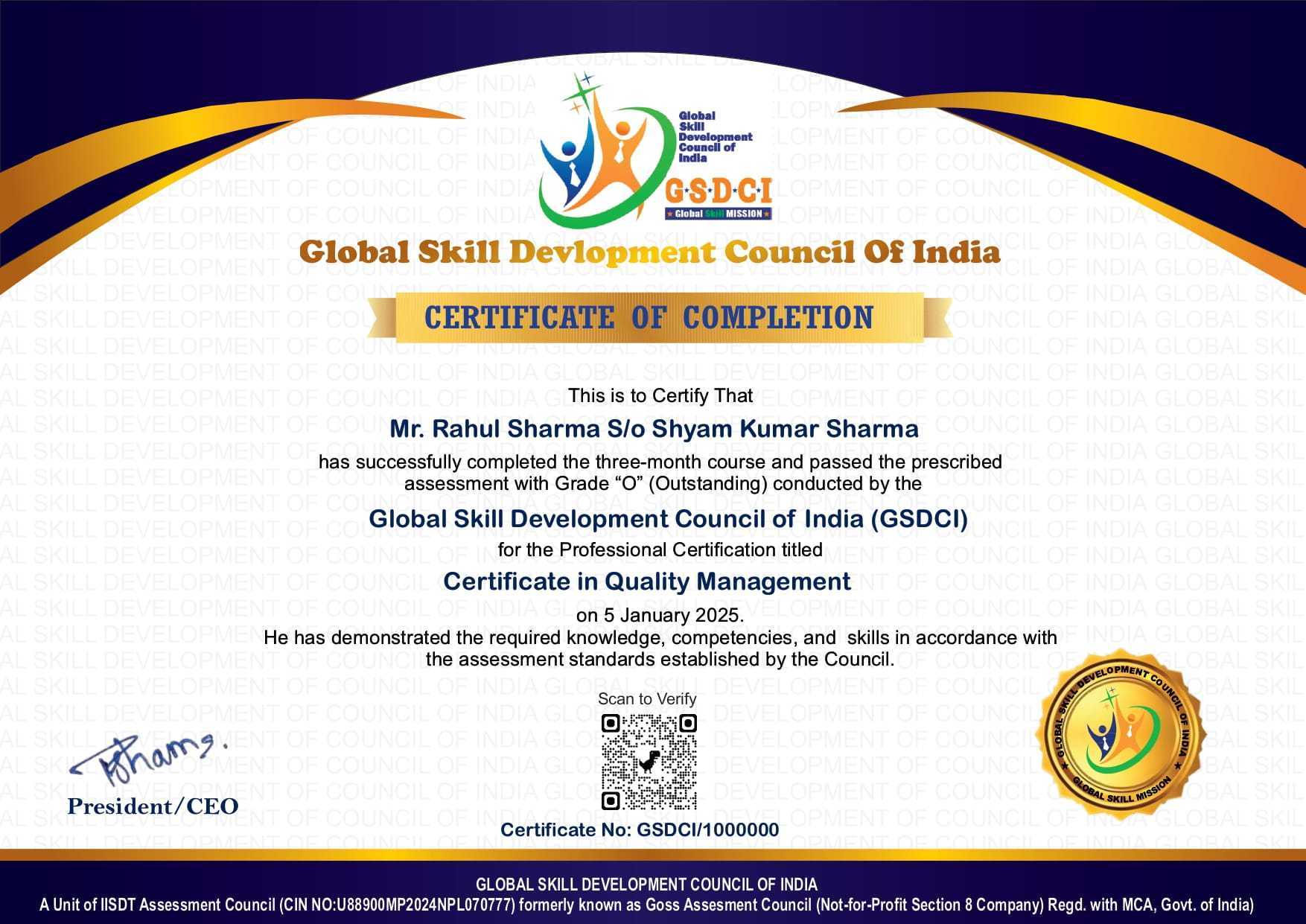
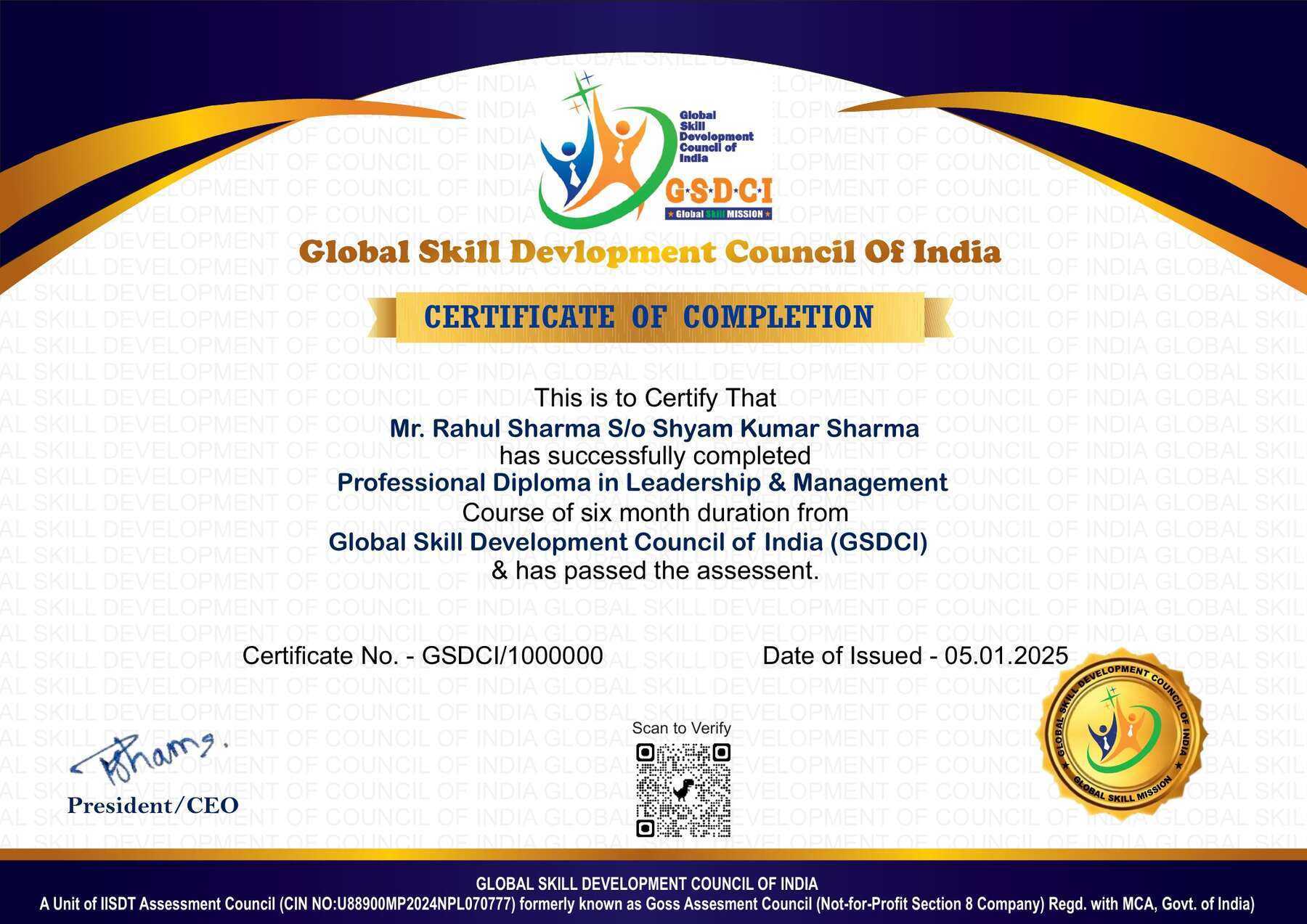
Step 8:┬аUpon passing the examination, you will receive:
тАв A┬аsoft copy┬а(scanned) of your certificate via email within 7 days of examination.
тАв A┬аhard copy┬а(original with official seal and signature) sent to your address within 45 day of declaration of result.

Step 9:┬аAfter certification, you will be offered┬аjob opportunities┬аaligned with your area of interest.

Online Examination Detail:

Duration- 60 minutes.
No. of Questions- 30. (Multiple Choice Questions).
Maximum Marks- 100, Passing Marks- 40%.
There is no negative marking in this module.

Marking System:
S.No. No. of Questions Marks Each Question Total Marks
1 10 5 50
2 5 4 20
3 5 3 15
4 5 2 10
5 5 1 5
30 100
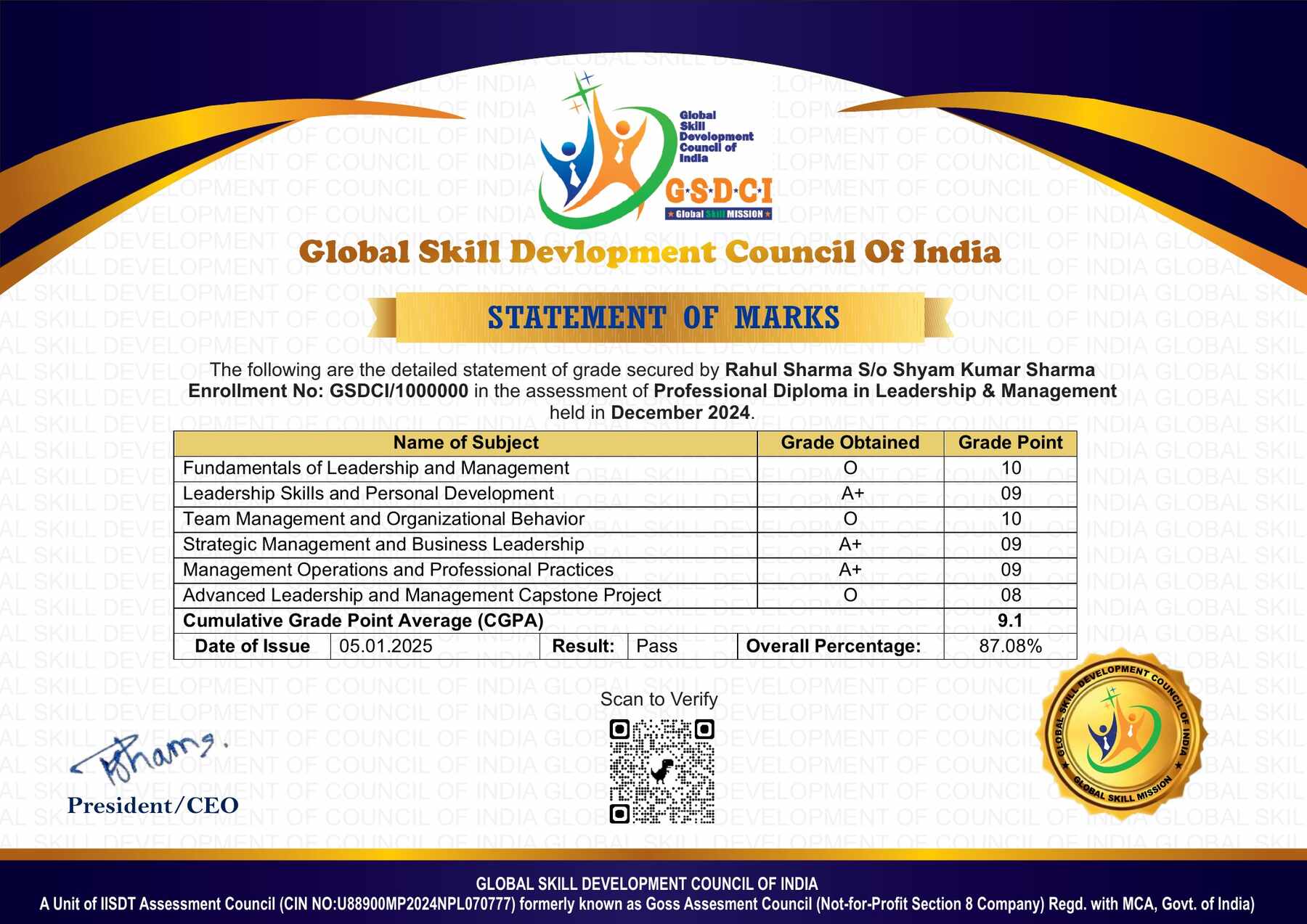
How Students will be Graded:
S.No. Marks Grade
1 91-100 O (Outstanding)
2 81-90 A+ (Excellent)
3 71-80 A (Very Good)
4 61-70 B (Good)
5 51-60 C (Average)
6 40-50 P (Pass)
7 0-40 F (Fail)

Key Benefits of Certification-┬аEarning a professional certification not only validates your skills but also enhances your employability. Here are the major benefits you gain:

Practical, Job-Ready Skills тАУ Our certifications are designed to equip you with real-world, hands-on skills that match current industry demands тАФ helping you become employment-ready from day one.

Lifetime Validity тАУ Your certification is valid for a lifetime тАФ no renewals or expirations. It serves as a permanent proof of your skills and training.

Lifetime Certificate Verification тАУ Employers and institutions can verify your certification anytime through a secure and reliable verification system тАФ adding credibility to your qualifications.

Industry-Aligned Certification тАУAll certifications are developed in consultation with industry experts to ensure that what you learn is current, relevant, and aligned with market needs.

Preferred by Employers тАУ Candidates from ISO-certified institutes are often prioritized by recruiters due to their exposure to standardized, high-quality training.

Free Job Assistance Based on Your Career Interests тАУ Receive personalized job assistance and career guidance in your preferred domain, helping you land the right role faster.

Syllabus:-

Foundations of Digital Video Editing and NLE Workflows:┬аIntroduction to Non-Linear Editing (NLE) Systems and Software Interface, Asset Management, Footage Ingestion, and Project Organization, Understanding Video Resolutions, Aspect Ratios, and Frame Rates, Timeline Management, Source Monitors, and Basic Cutting Tools, Three-Point Editing, Trimming, Rippling, and Rolling Techniques, Working with Multicam Footage and Synchronizing Audio, Audio Editing, Dialogue Clean-up, and Sound Design Basics, Principles of Continuity Editing and Narrative Pacing, Export Settings, Video Codecs, and Bitrate Optimization, Offline vs. Online Editing Workflows and Proxy Creation

Advanced Editing Techniques and Narrative Pacing:┬аAdvanced Timeline Navigation, J-Cuts, and L-Cuts Implementation, Match Cuts, Jump Cuts, and Cross-Cutting for Dramatic Tension, Time Remapping, Speed Ramps, and Freeze Frame Effects, Structural Editing for Commercials, Promos, and Music Videos, Invisible Editing Techniques and Creative Continuity Transitions, Multi-Layer Timeline Organization and Nested Sequences, Dynamic Linking Between Editing and Compositing Software, Working with Subclips, Markers, and Metadata Systems, Advanced Audio Mixing, Keyframing Sound, and Mastering Tracks, Preparing Timelines for Color Grading and VFX Conform

Introduction to Visual Effects (VFX) and Digital Compositing:┬аCore Concepts of Spatial Layering and Alpha Channels, Introduction to Node-Based vs. Layer-Based Compositing, Working with Mattes, Masks and Path Selections, Fundamentals of Chroma Keying, Green/Blue Screen Extraction, Rotoscoping Techniques, Edge Refinement and Garbage Mattes, Motion Tracking Basics: One-Point and Two-Point Transformations, Planar Tracking for Screen Replacements and Surface Matching, Principles of Set Extension and Digital Matte Paintings, Color Spill Suppression and Edge Blending Procedures, Matchmoving Basics and Integrating 3D Assets into 2D Footage, VFX Pipeline Integration and Collaboration Protocols

Motion Graphics, Kinetic Typography and 2.5D Animation:┬аPrinciples of Animation, Keyframing, and Spatial Interpolation, Using Value and Speed Graphs for Smooth Motion Curves, Creating and Animating Vector Shapes and Custom Mattes, Kinetic Typography, Title Design, and Lower Thirds Creation, Introduction to 3D Layers, Cameras, and Lights in Compositing, Parallax Effects and Creating 2.5D Environments from Static Images, Particle Systems Generation for Smoke, Fire, and Dust Effects, Expressions and Scripting Basics for Automated Animation, Expressions for Wiggle, Loop, and Time Properties, Integrating Vector Graphics from Illustrative Design Tools

Color Grading, Digital Cinematography and Visual Style:┬аIntroduction to Color Correction vs. Stylized Color Grading, Understanding Scopes: Waveform, Vectorscope, Histogram and Parade, Primary Color Correction: Wheels, Sliders and Curve Adjustments, Secondary Color Corrections: HSL Qualifiers and Targeted Masking, Working with Log (LOG) Footage and Utilizing LUTs (Look-Up Tables), Shot Matching for Continuity Across Disparate Lighting Conditions, Creating Visual Moods, Cinematic Styles and Day-for-Night Conversions, Skin Tone Optimization and Specialized Beauty Clean-up, HDR (High Dynamic Range) Workflow Essentials, Final Color Mastering and Broadcast Legal Compliance Verification

Advanced VFX Compositing, Clean-up and Industry Portfolio:┬аAdvanced 3D Camera Tracking and Point Cloud Generation, Wire, Rig, and Logo Removal Using Digital Clean-up, Camera Projection Techniques for Advanced Matte Backgrounds, Simulating Natural Phenomena: Rain, Fog, and Atmospheric Distortions, Multi-Pass CGI Compositing: Beauty, Depth, and Ambient Occlusion, Deep Compositing Principles and Z-Depth Matte Manipulations, Motion Blur, Grain Matching, and Lens Aberration Simulations, Creative Finishing, Mastering Formats, and Digital Delivery Standards, Showreel Packaging, Breakdown Videos, and Portfolio Presentation, Freelance Management, Studio Workflows, and Production Pipeline Ethics

Hindi Syllabus:-

рд╡реАрдбрд┐рдпреЛ рдПрдбрд┐рдЯрд┐рдВрдЧ рдПрд╡рдВ рд╡рд┐рдЬреБрдЕрд▓ рдЗрдлреЗрдХреНрдЯреНрд╕ рдХрд╛ рдкрд░рд┐рдЪрдп: рд╡реАрдбрд┐рдпреЛ рдПрдбрд┐рдЯрд┐рдВрдЧ рдХреА рдЕрд╡рдзрд╛рд░рдгрд╛ рдПрд╡рдВ рдорд╣рддреНрд╡, рд╡рд┐рдЬреБрдЕрд▓ рдЗрдлреЗрдХреНрдЯреНрд╕ (VFX) рдХрд╛ рдкрд░рд┐рдЪрдп рдПрд╡рдВ рд╡рд┐рдХрд╛рд╕, рдлрд┐рд▓реНрдо рдПрд╡рдВ рдбрд┐рдЬрд┐рдЯрд▓ рдореАрдбрд┐рдпрд╛ рдореЗрдВ VFX рдХрд╛ рдЙрдкрдпреЛрдЧ, рд╡реАрдбрд┐рдпреЛ рдкреНрд░реЛрдбрдХреНрд╢рди рдПрд╡рдВ рдкреЛрд╕реНрдЯ-рдкреНрд░реЛрдбрдХреНрд╢рди рдХреА рдкреНрд░рдХреНрд░рд┐рдпрд╛, рд╡реАрдбрд┐рдпреЛ рдлреЙрд░реНрдореЗрдЯ рдПрд╡рдВ рдлрд╛рдЗрд▓ рдкреНрд░рдХрд╛рд░реЛрдВ рдХрд╛ рдЕрдзреНрдпрдпрди, рдлреНрд░реЗрдо рд░реЗрдЯ рдПрд╡рдВ рд╡реАрдбрд┐рдпреЛ рд░реЗрдЬреЛрд▓реНрдпреВрд╢рди рдХреА рдЕрд╡рдзрд╛рд░рдгрд╛, рд╡реАрдбрд┐рдпреЛ рдПрдбрд┐рдЯрд┐рдВрдЧ рд╕реЙрдлреНрдЯрд╡реЗрдпрд░ рдХрд╛ рдкрд░рд┐рдЪрдп, Adobe Premiere Pro рдПрд╡рдВ DaVinci Resolve рдХреА рдореВрд▓ рдЬрд╛рдирдХрд╛рд░реА, Adobe After Effects рдХрд╛ рдкрд░рд┐рдЪрдп, рд╡реАрдбрд┐рдпреЛ рдПрдбрд┐рдЯрд░ рдПрд╡рдВ VFX рдЖрд░реНрдЯрд┐рд╕реНрдЯ рдХреА рднреВрдорд┐рдХрд╛ рдПрд╡рдВ рдЬрд┐рдореНрдореЗрджрд╛рд░рд┐рдпрд╛рдБ

рд╡реАрдбрд┐рдпреЛ рдПрдбрд┐рдЯрд┐рдВрдЧ рддрдХрдиреАрдХ рдПрд╡рдВ рдЯрд╛рдЗрдорд▓рд╛рдЗрди рдкреНрд░рдмрдВрдзрди: рд╡реАрдбрд┐рдпреЛ рдПрдбрд┐рдЯрд┐рдВрдЧ рдЗрдВрдЯрд░рдлреЗрд╕ рдПрд╡рдВ рд╡рд░реНрдХрд╕реНрдкреЗрд╕ рдХрд╛ рдкрд░рд┐рдЪрдп, рд╡реАрдбрд┐рдпреЛ рдлреБрдЯреЗрдЬ рдЗрдВрдкреЛрд░реНрдЯ рдПрд╡рдВ рдореАрдбрд┐рдпрд╛ рдкреНрд░рдмрдВрдзрди, рдЯрд╛рдЗрдорд▓рд╛рдЗрди рдПрд╡рдВ рд╕реАрдХреНрд╡реЗрдВрд╕ рд╕реЗрдЯрд┐рдВрдЧреНрд╕, рд╡реАрдбрд┐рдпреЛ рдХрдЯрд┐рдВрдЧ рдЯреНрд░рд┐рдорд┐рдВрдЧ рдПрд╡рдВ рд╕реНрдкреНрд▓рд┐рдЯрд┐рдВрдЧ рддрдХрдиреАрдХ, рдорд▓реНрдЯреА-рдЯреНрд░реИрдХ рд╡реАрдбрд┐рдпреЛ рдПрдбрд┐рдЯрд┐рдВрдЧ, рд╡реАрдбрд┐рдпреЛ рдЯреНрд░рд╛рдВрдЬрд┐рд╢рди рдПрд╡рдВ рдЙрдирдХреЗ рдЙрдкрдпреЛрдЧ, рд╡реАрдбрд┐рдпреЛ рд╕реНрдкреАрдб рдХрдВрдЯреНрд░реЛрд▓ рдПрд╡рдВ рд╕реНрд▓реЛ рдореЛрд╢рди рддрдХрдиреАрдХ, рдСрдбрд┐рдпреЛ рдПрд╡рдВ рд╡реАрдбрд┐рдпреЛ рд╕рд┐рдВрдХреНрд░реЛрдирд╛рдЗрдЬреЗрд╢рди, рдорд▓реНрдЯреА-рдХреИрдорд░рд╛ рдПрдбрд┐рдЯрд┐рдВрдЧ рдХрд╛ рдкрд░рд┐рдЪрдп, рд╡реАрдбрд┐рдпреЛ рдПрдбрд┐рдЯрд┐рдВрдЧ рд╡рд░реНрдХрдлреНрд▓реЛ рдПрд╡рдВ рдкреНрд░реЛрдЬреЗрдХреНрдЯ рдкреНрд░рдмрдВрдзрди

рдореЛрд╢рди рдЧреНрд░рд╛рдлрд┐рдХреНрд╕ рдПрд╡рдВ рд╡рд┐рдЬреБрдЕрд▓ рдЗрдлреЗрдХреНрдЯреНрд╕ рддрдХрдиреАрдХ: рдореЛрд╢рди рдЧреНрд░рд╛рдлрд┐рдХреНрд╕ рдХреА рдЕрд╡рдзрд╛рд░рдгрд╛ рдПрд╡рдВ рдЙрдкрдпреЛрдЧ, рдХреАрдлреНрд░реЗрдо рдПрдиреАрдореЗрд╢рди рдХреЗ рдореВрд▓ рд╕рд┐рджреНрдзрд╛рдВрдд, рдкреЛрдЬреАрд╢рди рд╕реНрдХреЗрд▓ рд░реЛрдЯреЗрд╢рди рдПрд╡рдВ рдУрдкреЗрд╕рд┐рдЯреА рдПрдиреАрдореЗрд╢рди, рдЯреЗрдХреНрд╕реНрдЯ рдПрдиреАрдореЗрд╢рди рдПрд╡рдВ рдЯрд╛рдЗрдЯрд▓ рдбрд┐рдЬрд╛рдЗрди, рд╢реЗрдк рд▓реЗрдпрд░ рдПрд╡рдВ рдЧреНрд░рд╛рдлрд┐рдХ рдПрд▓рд┐рдореЗрдВрдЯреНрд╕ рдХрд╛ рдЙрдкрдпреЛрдЧ, рдорд╛рд╕реНрдХрд┐рдВрдЧ рдПрд╡рдВ рд▓реЗрдпрд░ рдХрдВрдкреЛрдЬрд┐рдЯрд┐рдВрдЧ, рдЧреНрд░реАрди рд╕реНрдХреНрд░реАрди рдПрд╡рдВ рдХреНрд░реЛрдорд╛ рдХреА рддрдХрдиреАрдХ, рдореЛрд╢рди рдЯреНрд░реИрдХрд┐рдВрдЧ рдХрд╛ рдкрд░рд┐рдЪрдп, рд░реЛрдЯреЛрд╕реНрдХреЛрдкрд┐рдВрдЧ рдХреА рдореВрд▓ рддрдХрдиреАрдХ, рдбрд┐рдЬрд┐рдЯрд▓ рд╡рд┐рдЬреБрдЕрд▓ рдЗрдлреЗрдХреНрдЯреНрд╕ рдПрд╡рдВ рдХрдВрдкреЛрдЬрд┐рдЯрд┐рдВрдЧ рдХрд╛ рд╡реНрдпрд╛рд╡рд╣рд╛рд░рд┐рдХ рдЕрднреНрдпрд╛рд╕

рдПрдбрд╡рд╛рдВрд╕реНрдб VFX рдПрд╡рдВ рд╡реАрдбрд┐рдпреЛ рдХрдВрдкреЛрдЬрд┐рдЯрд┐рдВрдЧ: рдПрдбрд╡рд╛рдВрд╕реНрдб рд▓реЗрдпрд░ рдХрдВрдкреЛрдЬрд┐рдЯрд┐рдВрдЧ рддрдХрдиреАрдХ, 2D рдПрд╡рдВ 3D рдХрдВрдкреЛрдЬрд┐рдЯрд┐рдВрдЧ рдХрд╛ рдкрд░рд┐рдЪрдп, рдХреИрдорд░рд╛ рдЯреНрд░реИрдХрд┐рдВрдЧ рдПрд╡рдВ рдореИрдЪ рдореВрд╡рд┐рдВрдЧ рдХреА рдореВрд▓ рдмрд╛рддреЗрдВ, рдСрдмреНрдЬреЗрдХреНрдЯ рд░рд┐рдореВрд╡рд▓ рдПрд╡рдВ рдХреНрд▓реАрди рдкреНрд▓реЗрдЯ рддрдХрдиреАрдХ, рдбрд┐рдЬрд┐рдЯрд▓ рдмреИрдХрдЧреНрд░рд╛рдЙрдВрдб рд░рд┐рдкреНрд▓реЗрд╕рдореЗрдВрдЯ, рдкрд╛рд░реНрдЯрд┐рдХрд▓ рдЗрдлреЗрдХреНрдЯреНрд╕ рдПрд╡рдВ рд╕рд┐рдореБрд▓реЗрд╢рди рдХрд╛ рдкрд░рд┐рдЪрдп, рд▓рд╛рдЗрдЯрд┐рдВрдЧ рдПрд╡рдВ рд╢реИрдбреЛ рдореИрдЪрд┐рдВрдЧ рддрдХрдиреАрдХ, рд╕реНрдХреНрд░реАрди рд░рд┐рдкреНрд▓реЗрд╕рдореЗрдВрдЯ рдПрд╡рдВ рдбрд┐рдЬрд┐рдЯрд▓ рдПрд▓рд┐рдореЗрдВрдЯ рдЗрдВрдЯреАрдЧреНрд░реЗрд╢рди, рд╡рд┐рдЬреБрдЕрд▓ рдЗрдлреЗрдХреНрдЯреНрд╕ рдореЗрдВ рдмреНрд▓реЗрдВрдбрд┐рдВрдЧ рдореЛрдб рдПрд╡рдВ рдореИрдЯ рддрдХрдиреАрдХ, VFX рд╢реЙрдЯ рдХреА рдЧреБрдгрд╡рддреНрддрд╛ рдЬрд╛рдБрдЪ рдПрд╡рдВ рдлрд╛рдЗрдирд▓ рдХрдВрдкреЛрдЬрд┐рдЯрд┐рдВрдЧ

рдХрд▓рд░ рдЧреНрд░реЗрдбрд┐рдВрдЧ, рдСрдбрд┐рдпреЛ рдПрдбрд┐рдЯрд┐рдВрдЧ рдПрд╡рдВ рд╡реАрдбрд┐рдпреЛ рдлрд┐рдирд┐рд╢рд┐рдВрдЧ: рдХрд▓рд░ рдХрд░реЗрдХреНрд╢рди рдПрд╡рдВ рдХрд▓рд░ рдЧреНрд░реЗрдбрд┐рдВрдЧ рдХреА рдЕрд╡рдзрд╛рд░рдгрд╛, рд╡реНрд╣рд╛рдЗрдЯ рдмреИрд▓реЗрдВрд╕ рдПрд╡рдВ рдПрдХреНрд╕рдкреЛрдЬрд░ рд╕реБрдзрд╛рд░, рдХрдВрдЯреНрд░рд╛рд╕реНрдЯ рд╕реИрдЪреБрд░реЗрд╢рди рдПрд╡рдВ рдХрд▓рд░ рдЯреЛрди рд╕рдорд╛рдпреЛрдЬрди, LUTs рдПрд╡рдВ рд╕рд┐рдиреЗрдореИрдЯрд┐рдХ рдХрд▓рд░ рд▓реБрдХ рдХрд╛ рдкрд░рд┐рдЪрдп, рдСрдбрд┐рдпреЛ рдПрдбрд┐рдЯрд┐рдВрдЧ рдПрд╡рдВ рд╕рд╛рдЙрдВрдб рдбрд┐рдЬрд╛рдЗрди рдХреА рдореВрд▓ рдмрд╛рддреЗрдВ, рдмреИрдХрдЧреНрд░рд╛рдЙрдВрдб рдореНрдпреВрдЬрд┐рдХ рдПрд╡рдВ рд╕рд╛рдЙрдВрдб рдЗрдлреЗрдХреНрдЯреНрд╕ рдХрд╛ рдЙрдкрдпреЛрдЧ, рдСрдбрд┐рдпреЛ рдиреЙрдЗрдЬ рд░рд┐рдбрдХреНрд╢рди рдПрд╡рдВ рд╡реЙрд▓реНрдпреВрдо рдмреИрд▓реЗрдВрд╕рд┐рдВрдЧ, рд╕рдмрдЯрд╛рдЗрдЯрд▓ рдПрд╡рдВ рдХреИрдкреНрд╢рди рддреИрдпрд╛рд░ рдХрд░рдирд╛, рд╡реАрдбрд┐рдпреЛ рд░реЗрдВрдбрд░рд┐рдВрдЧ рдПрд╡рдВ рдПрдХреНрд╕рдкреЛрд░реНрдЯ рд╕реЗрдЯрд┐рдВрдЧреНрд╕, рд╡рд┐рднрд┐рдиреНрди рдбрд┐рдЬрд┐рдЯрд▓ рдкреНрд▓реЗрдЯрдлреЙрд░реНрдо рдХреЗ рд▓рд┐рдП рд╡реАрдбрд┐рдпреЛ рдСрдкреНрдЯрд┐рдорд╛рдЗрдЬреЗрд╢рди

рд╡реНрдпрд╛рд╡рд╣рд╛рд░рд┐рдХ рд╡реАрдбрд┐рдпреЛ рдПрдбрд┐рдЯрд┐рдВрдЧ рдПрд╡рдВ VFX рдкреНрд░реЛрдЬреЗрдХреНрдЯ рдкреНрд░рд╢рд┐рдХреНрд╖рдг: рд╡реАрдбрд┐рдпреЛ рдПрдбрд┐рдЯрд┐рдВрдЧ рдкреНрд░реЛрдЬреЗрдХреНрдЯ рдХреА рдпреЛрдЬрдирд╛ рдПрд╡рдВ рд╕реНрдЯреЛрд░реАрдмреЛрд░реНрдб рддреИрдпрд╛рд░ рдХрд░рдирд╛, рд░реЙ рдлреБрдЯреЗрдЬ рдХрд╛ рдЪрдпрди рдПрд╡рдВ рд╡реНрдпрд╡рд╕реНрдерд┐рдд рдкреНрд░рдмрдВрдзрди, рд╢реЙрд░реНрдЯ рдлрд┐рд▓реНрдо рдПрд╡рдВ рдкреНрд░рдореЛрд╢рдирд▓ рд╡реАрдбрд┐рдпреЛ рдПрдбрд┐рдЯрд┐рдВрдЧ рдХрд╛ рдЕрднреНрдпрд╛рд╕, рд╕реЛрд╢рд▓ рдореАрдбрд┐рдпрд╛ рд░реАрд▓реНрд╕ рдПрд╡рдВ рдпреВрдЯреНрдпреВрдм рд╡реАрдбрд┐рдпреЛ рдирд┐рд░реНрдорд╛рдг, рдореЛрд╢рди рдЧреНрд░рд╛рдлрд┐рдХреНрд╕ рдПрд╡рдВ рдПрдирд┐рдореЗрдЯреЗрдб рдЯрд╛рдЗрдЯрд▓ рддреИрдпрд╛рд░ рдХрд░рдирд╛, рдЧреНрд░реАрди рд╕реНрдХреНрд░реАрди рдПрд╡рдВ рдХреНрд░реЛрдорд╛ рдХреА рдХрдВрдкреЛрдЬрд┐рдЯрд┐рдВрдЧ рдХрд╛ рд╡реНрдпрд╛рд╡рд╣рд╛рд░рд┐рдХ рдЕрднреНрдпрд╛рд╕, рдореЛрд╢рди рдЯреНрд░реИрдХрд┐рдВрдЧ рдПрд╡рдВ рд░реЛрдЯреЛрд╕реНрдХреЛрдкрд┐рдВрдЧ рдХрд╛ рдкреНрд░реИрдХреНрдЯрд┐рдХрд▓ рдкреНрд░реЛрдЬреЗрдХреНрдЯ, рдХрд▓рд░ рдЧреНрд░реЗрдбрд┐рдВрдЧ рдПрд╡рдВ рдСрдбрд┐рдпреЛ рдорд┐рдХреНрд╕рд┐рдВрдЧ рдХрд╛ рдЕрднреНрдпрд╛рд╕, рдкреНрд░реЛрдлреЗрд╢рдирд▓ рд╡реАрдбрд┐рдпреЛ рдкреЛрд░реНрдЯрдлреЛрд▓рд┐рдпреЛ рдПрд╡рдВ рдХреНрд▓рд╛рдЗрдВрдЯ рдкреНрд░реЛрдЬреЗрдХреНрдЯ рдкреНрд░рдмрдВрдзрди, рд╕рдВрдкреВрд░реНрдг VFX рд╡реАрдбрд┐рдпреЛ рдПрдбрд┐рдЯрд┐рдВрдЧ рдкреНрд░реЛрдЬреЗрдХреНрдЯ рдПрд╡рдВ рдЕрдВрддрд┐рдо рдкреНрд░рд╕реНрддреБрддрд┐

Job Opportunities after completion of Certificate in VFX Video Editing course:

Graduates can build careers in video production, visual effects, and multimedia content creation across industries such as film, television, advertising, gaming, and digital media.

Top Roles: VFX Artist, Video Editor, Motion Graphics Designer, Compositor, 3D Animator, Video Production Specialist, Post-production Supervisor, Visual Effects Supervisor, Color Grading Specialist, Advertising Video Editor, Game Designer (VFX), Multimedia Designer, Social Media Content Creator, Freelance VFX Artist/Editor

Key Skills: Video editing, VFX tools (Adobe After Effects, Nuke, DaVinci Resolve), motion graphics, color grading, compositing, storytelling, 3D animation, creativity, attention to detail.

Salary Range (India):

Entry-level: тВ╣2.5тАУ5 LPA
Mid-level: тВ╣5тАУ10 LPA
Senior-level: тВ╣10тАУ20 LPA+
Top roles: тВ╣20тАУ25 LPA+

Scope: Rapidly growing field driven by OTT platforms, digital marketing, gaming, and content creation. High demand for skilled professionals with strong freelance, remote work, and creative career opportunities in media and entertainment industries.

Course Rating

4.9/5
тШЕтШЕтШЕтШЕтШЕ
тШЕтШЕтШЕтШЕтШЕ

Based on 53 student ratings

Highly Rated Course

0
    0
    Your Certification Detail
    Your cart is emptyReturn to Shop
      Apply Coupon
      Available Coupons
      gsdci20 Get 20% off